How to Build a Voice of the Customer Program: Templates & Surveys (2026)
Set up a voice of the customer program: a 10-step checklist, survey timing, six copyable question templates, and how to analyze and act on feedback.
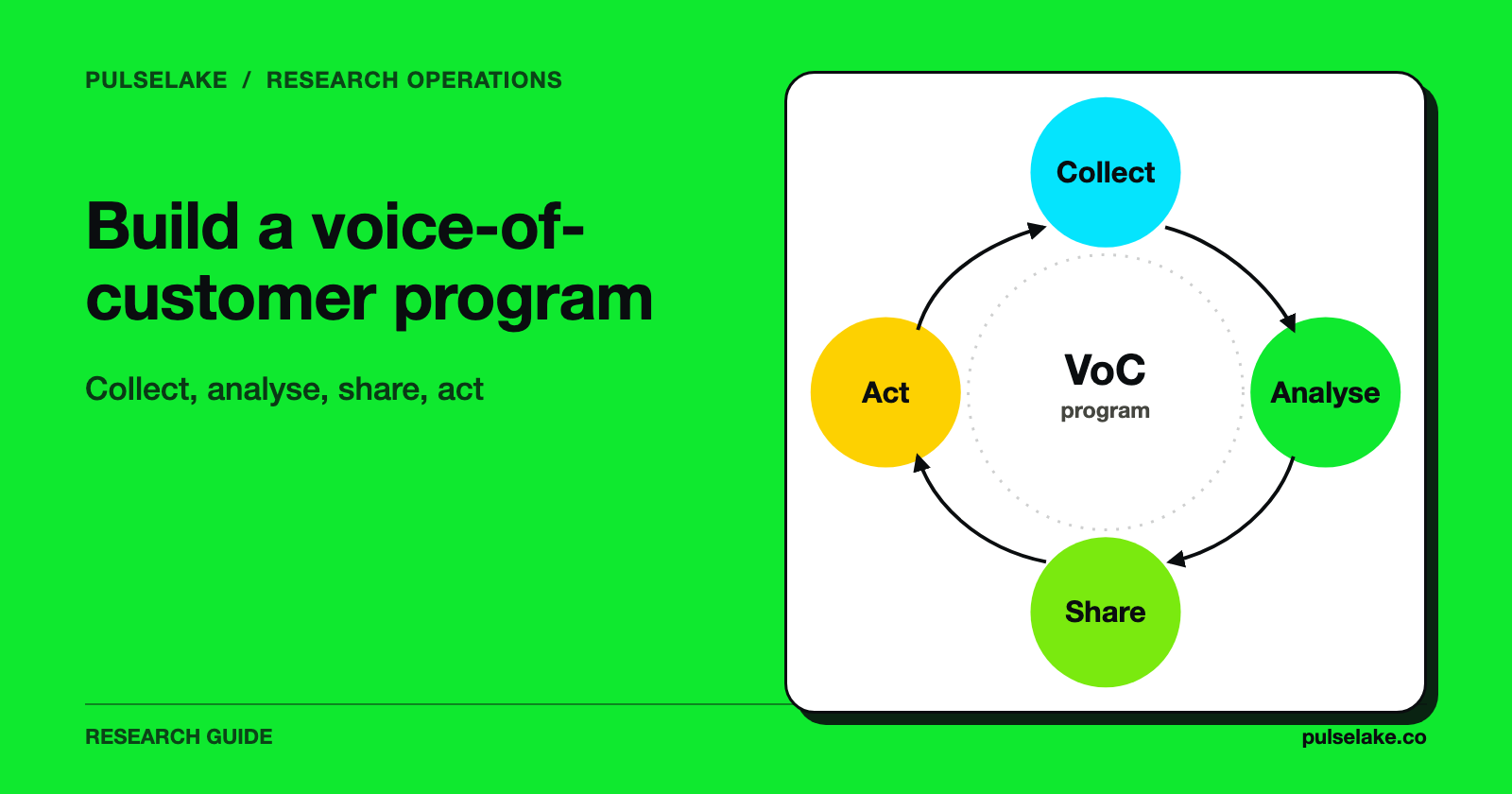
To build a voice of the customer (VoC) program, pick one decision the feedback must inform, collect from a small number of well-timed sources, ask short surveys that pair a score with an open-text question, and give every finding an owner and a date. The survey is the easy part. The program is the routine that turns answers into changes and tells customers what changed.
We make PulseLake, a research platform, and mention it once below. The templates and checklist work in any survey tool.

What does a voice of the customer program consist of?
A VoC program has five working parts: a decision it serves, sources of feedback, survey instruments, an analysis routine and an action loop. Most programs that stall have the first three and none of the last two. Responses pile up in a dashboard, nobody owns the follow-up, and customers never hear back.
This guide covers the how-to. For a definition of VoC and the frameworks behind it, use a separate explainer; here we stay with setup, question design and analysis.
Two survey types carry most of the work:
- Transactional surveys are triggered by an event, such as a closed support ticket, a completed onboarding step or a cancellation. They are short and sent within hours, while the memory is fresh.
- Relationship surveys go out on a schedule, commonly quarterly, and ask about the overall experience over time.
Zonka Feedback draws the same distinction and suggests roughly three to five questions for transactional surveys and six to seven for relationship surveys (Zonka Feedback). Treat those counts as a starting point. Vendor guides disagree with each other on exact numbers, so test length against your own completion rates.
How do you set up a VoC program? A checklist
Work through these in order. Each step is a deliverable, not a discussion.
- Name the decision. Write one sentence: "This program will tell us whether to change X." For example, a hypothetical product team might write, "Should we rebuild onboarding before the next release?" A program with no decision becomes a reporting exercise.
- Choose the customers. List the segments that matter (new users, long-tenured accounts, admins versus invited users, people who cancelled). Decide who is excluded, such as accounts that were surveyed in the last 90 days.
- Pick two or three sources. Combine a survey, support tickets or call notes, and a small number of interviews. Do not start with eleven channels.
- Map the moments. Decide which events trigger a survey and which run on a calendar (the timing table below).
- Write the instruments. Use the templates in this article, and cut every question that nobody will act on.
- Set consent and data rules. Say what you collect, how long you keep it and who can see named responses. Confirm with your privacy lead before attaching feedback to identified accounts.
- Assign owners. Every theme needs one person accountable for deciding what happens next. Product, support, success and engineering usually split the themes.
- Define the review cadence. A monthly review that looks at themes, decisions made and actions closed is enough for most teams.
- Close the loop. Follow up with unhappy respondents, and tell the wider customer base what changed because of feedback.
- Measure the program itself. Track response rate, share of themes with an owner, days from finding to decision and number of changes shipped from feedback. These show whether the program works, which a satisfaction score alone cannot.
When should each survey be sent?
Timing changes what the answer means. Checkbox suggests tying surveys to events: product feedback after 7 to 14 days of active use or after a relevant release, customer service surveys right after ticket closure, and loyalty surveys on a quarterly pulse (Checkbox). Formbricks adds onboarding check-ins at day 3, 7 or 14 and a churn survey at the point of cancellation (Formbricks).
| Moment | Survey type | Trigger | Suggested length |
|---|---|---|---|
| Onboarding step completed | Transactional | Event | 3 to 4 questions |
| First weeks of use | Transactional | Day 7 or 14 of activity | 4 to 5 questions |
| Support ticket closed | Transactional | Event, within hours | 2 to 3 questions |
| Cancellation or downgrade | Transactional | Event | 3 to 4 questions |
| Overall relationship | Relationship | Quarterly | 6 to 7 questions |
The lengths are our working defaults, informed by the vendor guidance above. Adjust them after you see where respondents drop off. Our piece on eliminating survey fatigue covers how to avoid over-asking the same people.
What survey questions should a VoC survey include?
Use a score to track change over time and open text to explain it. Put the scored question first and the open-ended question last, and avoid stacking two questions in one ("Was the product fast and easy?"). Our guide to writing questions that don't bias responses goes deeper on wording.
Three standard measures appear in most VoC programs:
- Net Promoter Score (NPS): "How likely is it that you would recommend [company or product] to a friend or colleague?" on a 0 to 10 scale. Scores of 9 to 10 are promoters, 7 to 8 passives and 0 to 6 detractors. NPS is the percentage of promoters minus the percentage of detractors (Qualtrics).
- Customer satisfaction (CSAT): satisfaction with a specific interaction, commonly on a 1 to 5 scale.
- Customer effort score (CES): how easy it was to complete a task, commonly on a 1 to 7 agreement scale.
Checkbox recommends using these together, with CSAT and CES right after interactions and NPS on a quarterly rhythm (Checkbox).
Voice of customer survey templates you can copy
The templates below are ours, written from the structure vendor guides describe. Replace the bracketed words. Keep the order.
Template 1: Relationship survey (quarterly, 6 questions)
- How likely are you to recommend [product] to a colleague or friend? (0 to 10)
- What is the main reason for your score? (open text)
- Overall, how satisfied are you with [product]? (1 to 5, very dissatisfied to very satisfied)
- Which of these is most important to you right now? (select one: [feature A], [feature B], [feature C], [feature D], other)
- If [product] were no longer available tomorrow, what would you use instead? (open text, with "nothing" as an option)
- What is one thing we should change in the next three months? (open text)
Template 2: Onboarding survey (day 7 or 14, 4 questions)
- How easy was it to get started with [product]? (1 to 7, very difficult to very easy)
- What were you trying to get done when you signed up? (open text)
- What, if anything, slowed you down or confused you? (open text)
- Is there anything you expected to find that you could not? (yes or no; if yes, what?)
Template 3: Support follow-up (immediately after closure, 3 questions)
- How satisfied are you with the help you received? (1 to 5)
- Was your issue fully resolved? (yes, partly, no)
- What could we have done better? (open text, shown if the answer to question 1 is 3 or lower or the answer to question 2 is not "yes")
Template 4: Product team feature-priority survey (2 to 3 questions)
- Which of these problems costs you the most time? (rank up to three from a list of [problems])
- Describe the last time that problem happened. What did you do? (open text)
- How important is it that we solve this in the next six months? (1 to 5, not important to critical)
Question 2 asks about a real, recent event rather than a hypothetical wish. Recall is imperfect, so ask about recent events.
If your list is long and the ranking matters, consider MaxDiff instead of asking people to rate every item.
Template 5: Cancellation survey (at the point of exit, 3 questions)
- What is the main reason you are leaving? (select one: price, missing feature, switched to another tool, no longer need it, difficult to use, other)
- What would have kept you? (open text)
- May we contact you about your answer? (yes or no)
Template 6: Interview opener for follow-up conversations
Usercall suggests organizing open-ended probes around five elements: the trigger that made the problem urgent, the job the customer wanted done, the friction, the workaround and the consequence (Usercall). Our adaptation as interview prompts:
- Tell me about the last time you needed to [job]. What was going on?
- What happened between wanting to do it and getting it done?
- What did you try instead?
- What did it cost you in time, money or confidence?
How do you analyze VoC survey data?
Work in four passes.
1. Clean and segment. Remove duplicates and low-effort answers, then split results by segment and survey type. Our article on detecting low-quality survey responses lists the checks. An NPS of 30 across all customers can hide a strong score among large accounts and a weak one among new ones.
2. Code the open text. Read a sample of comments (our rule of thumb is 50 to 100), draft a short codebook of themes with a one-line definition and an example each, then apply it. Keep "other" under control by adding a theme when several comments share it. If you use AI to propose themes, check them against a sample you coded by hand. See finding themes in thousands of responses.
3. Quantify each theme. For each, record how many respondents mentioned it, which segments, and how it relates to the score. If you have enough responses, key driver analysis estimates which themes move satisfaction most. With small samples, report counts and quotes, not statistics.
4. Prioritize and decide. Rank themes by frequency, severity, the segment's value and the effort to fix. Write each finding as a decision: "New admins cannot find invite settings. Owner: product. Decision by: [date]."
Formbricks describes a similar order: categorize feedback, find themes across channels, quantify impact, prioritize and then measure outcomes (Formbricks).
How do you close the loop?
Closing the loop means two things. First, respond to individual customers who raised a problem, ideally within a few working days (our suggestion). Second, tell customers broadly what changed ("You asked for X; we shipped Y"). Zonka Feedback also lists routing issues to the team that can fix them as part of the same step (Zonka Feedback).
Vendor guides say little about how to confirm a fix worked. A simple method: after a change ships, re-ask the relevant question of the affected segment and compare it with the earlier result, noting that other changes may have influenced the difference.
What mistakes break a VoC program?
- Surveying without an owner. Feedback with no named recipient is archived, not used.
- Asking everything at once. A very long survey loses respondents (Zonka Feedback says completion drops beyond 10 questions).
- Reading only the score. A score tells you the direction, and open text tells you the reason.
- Ignoring non-respondents. Survey respondents are not all customers. People who never answer, and people who left, may hold different views. Add interviews or exit surveys to cover them.
- Treating survey answers as the whole picture. Pair stated opinions with behavior, such as usage and support data.
Where does PulseLake fit?
PulseLake supports surveys and AI-led interviews with real participants, with a research knowledge graph and cross-study search that keep questions, responses and findings together in one study context. It suits teams that want VoC findings to sit alongside other research. If your need is only a short in-product pulse or ticket-based CSAT, a lightweight survey or support tool may be simpler.
Frequently asked questions
How many questions should a VoC survey have?
Keep it short. Published guidance varies: Zonka Feedback suggests about 3 questions for a post-support survey and 6 to 7 for a relationship survey, and says completion drops beyond 10 questions. A reasonable default is 3 to 5 for transactional surveys and 6 to 7 for quarterly relationship surveys, with the open-ended question last.
What is the difference between a VoC survey and a CSAT survey?
CSAT measures satisfaction with one interaction. A VoC survey is broader and may include CSAT alongside NPS, effort and open-ended questions about needs and priorities.
How often should we run VoC surveys?
Transactional surveys run when the triggering event happens. Relationship surveys usually run quarterly. Avoid sending any one customer surveys too often; set a cooling-off period such as 90 days.
What is a good survey response rate?
It varies by channel, audience and relationship, and published figures have unclear sources, so we do not quote a benchmark. Track your own rate by channel and survey and look for changes after you shorten or retime a survey.
What are the best VoC questions for product teams?
Ask about recent events and real problems: the last time the problem occurred, what the customer did, what it cost them and what would have changed the outcome. Pair one score with one open-text question. Template 4 above is a starting point.
Do I need software to run a VoC program?
No. You can start with a survey tool, a shared spreadsheet for coding and a monthly review meeting. Software helps when volume grows, mainly for coding open text, tracking themes over time and keeping evidence linked to decisions.